On most social networks, the algorithm is a black box. You see what the platform decides you should see, optimised for engagement metrics that may have nothing to do with what you actually want. Bluesky took a fundamentally different approach: the algorithm is a marketplace. Anyone can publish a feed, anyone can subscribe, and you can pin multiple feeds to your home screen and switch between them freely. This changes how Bluesky feels to use, and it's worth understanding fully.
What Are Custom Feeds?
A Bluesky custom feed is an independently hosted algorithmic timeline. Each feed is a small web service, a "Feed Generator", that receives requests from Bluesky and returns a list of post URIs. What logic determines that list is entirely up to the feed creator. Some feeds are simple: show all posts containing a keyword. Others are sophisticated: rank posts by engagement within your network, filter by language, or surface content from accounts you've never followed but whose posts are popular in your interest area.
From your perspective as a user, a custom feed looks and feels like a standard timeline tab. You subscribe to a feed, it appears in your Feeds bar, and you can switch to it any time. Your Following feed is itself just a feed, it's not special, it's just the default.
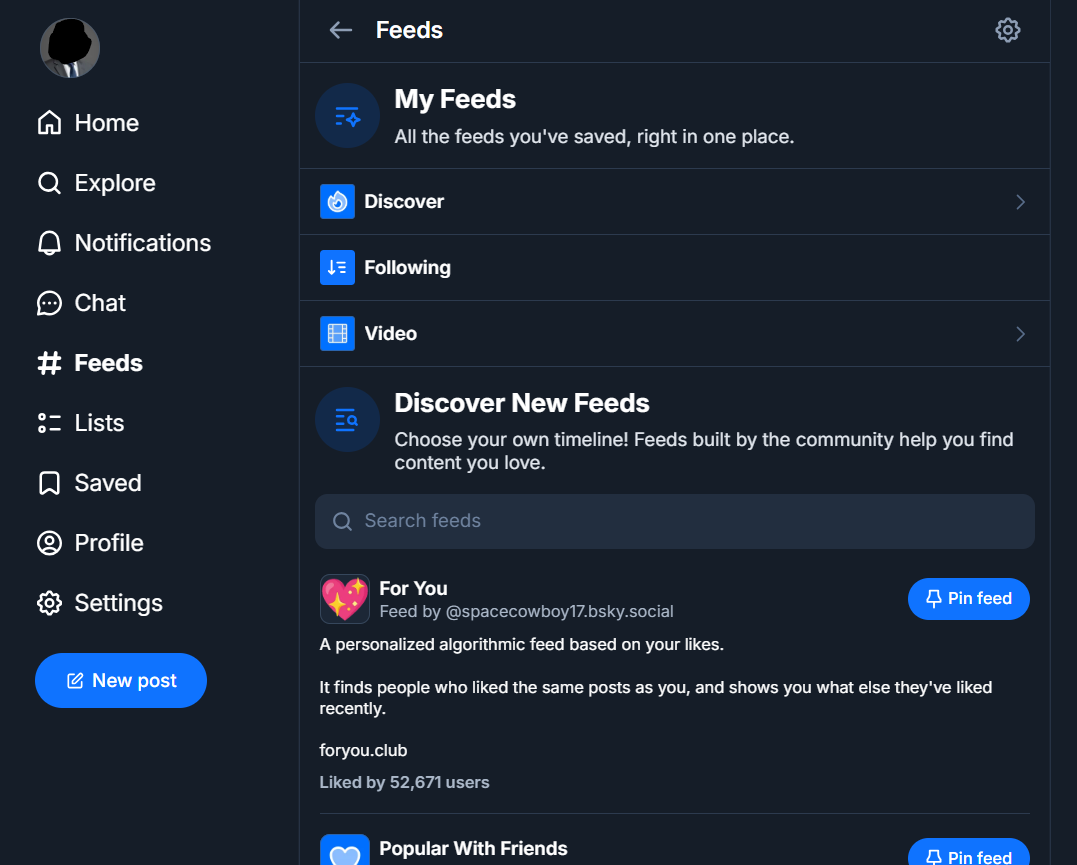
How to Find Custom Feeds
The in-app discovery is straightforward:
Open the Feeds tab
Tap the Feeds icon in the bottom navigation bar (it looks like a newspaper or grid). This shows your currently subscribed feeds.
Tap "Discover new feeds"
At the top of the Feeds screen you'll see a "Discover new feeds" or "Find feeds" option. This opens the feed discovery browser showing popular and trending feeds.
Search or browse by topic
Use the search bar to find feeds by keyword, or scroll through the curated list. Popular categories include science, art, tech, sports, news, and language-specific feeds.
Like to save, edit to pin
Tap the star/like icon on a feed to save it to your list. Then tap "Edit" in your Feeds tab to reorder feeds and pin your favourites to the tab bar for one-tap access.
Recommended Feeds to Start With
There are thousands of feeds. These are consistently well-regarded starting points:
- Discover (by Bluesky), Trending content from across your network. Good for finding new accounts.
- Science, Posts from researchers, academics, and science communicators. High signal-to-noise ratio.
- Quiet Posters, Surfaces posts from people you follow who don't post often. Prevents them getting buried.
- News, Aggregates posts from journalists and news organisations.
- Mutuals, Shows posts from accounts that follow you back. Great for community feel.
- Popular with Friends, Shows content that people you follow are engaging with.
Tip: Don't pin more than 4–5 feeds to your tab bar. Having too many makes it harder to develop a rhythm with any of them. Start with 2–3 alongside Following, see which you actually use, then adjust.
How to Create Your Own Custom Feed
Building a feed requires a server that implements the Feed Generator interface, basically a web endpoint that responds to Bluesky's API requests with a list of post IDs. There are two main approaches:
No-code: Skyfeed and similar tools
Tools like Skyfeed.app provide a visual interface for creating keyword-based and rule-based feeds without writing any code. You define your rules (show posts containing #Astronomy, from accounts with more than 100 followers, in English), give the feed a name, and publish it. It's live on the network immediately.
Code: AT Protocol Feed Generator SDK
For more sophisticated feeds, Bluesky provides a TypeScript SDK and a starter template on GitHub. The basic flow is: clone the starter template, implement your algorithm in the handler function, host it on any server (Fly.io, Railway, a VPS), and publish the feed's DID to the network. The official documentation at docs.bsky.app covers this in detail.
Feed Etiquette
A few things to know before building or promoting a feed:
- Feeds that include other users' posts without being clearly labelled as aggregators can confuse people, be transparent about what your feed does.
- If your feed uses engagement metrics, be careful about incentivising low-quality viral content.
- You can set your feed to only show content from accounts you follow, which many users prefer for privacy.
- Bluesky can remove feeds that violate their community guidelines, even if you host the generator yourself.
See what's trending across Bluesky right now
BskySuite's Trending Topics tool shows the top hashtags and topics across Bluesky, updated every 30 minutes. Useful for knowing which feeds are most active at any moment.
🔥 See trending topics →What Actually Happens When You Open a Feed
The architecture is unusual enough that it explains most of the behaviour people find surprising.
When you tap a custom feed, your Bluesky client asks the feed generator, a small service somewhere on the internet run by whoever made the feed, for a list of posts. Crucially, the generator returns only post identifiers, not the posts themselves. Bluesky then fetches the actual content for those identifiers and renders them.
That split matters. The feed author decides which posts appear and in what order, but never touches the content, and cannot alter a post, insert one that does not exist, or show you something you are blocked from seeing. Your own blocks and mutes are applied by Bluesky after the list comes back, so a feed cannot expose you to an account you have blocked, no matter what its algorithm says.
It also explains the failure modes. If the generator is slow, the feed is slow. If the person running it stops paying for hosting, the feed goes blank while still appearing in your list. A custom feed is a third-party service in a way that a normal timeline is not.
What a Feed Can and Cannot See About You
Since you are calling somebody else's server, the reasonable question is what they learn about you.
A feed generator receives your DID, the persistent identifier for your account, with each request. That is not anonymous. An operator can tell that a specific account requested the feed, roughly when, and how often. Some feeds use exactly this to personalise results, for example showing you posts from accounts you follow.
What it does not get is anything private. Your password, email, direct messages, drafts and notifications never leave Bluesky. A feed cannot post for you, follow anyone, or change a setting. The worst a badly behaved feed can do is show you content you would rather not see, and record that you asked for it.
For most people this is a fair trade. If it is not, the answer is simple: use feeds run by people or organisations you recognise, and unsubscribe from anything you cannot identify the operator of.
Feeds vs Lists vs Starter Packs
Bluesky has three grouping tools and people routinely reach for the wrong one.
| Custom feed | List | Starter pack | |
|---|---|---|---|
| What it contains | Posts matching a rule | A fixed set of accounts | Accounts, plus optional feeds |
| Who decides membership | An algorithm | You | The curator |
| Creates follows | No | No | Yes, on Follow All |
| Updates automatically | Yes, continuously | Only when you edit it | No, it is a snapshot |
| Needs hosting | Yes, a generator service | No | No |
| Best for | Discovering posts on a subject | Reading a group without following | Helping newcomers follow a community |
The distinction that matters: a feed follows a topic, a list follows people. If you want everything about marine biology regardless of author, that is a feed. If you want these eleven specific researchers, that is a list. Our starter packs guide covers the third case.
Getting Your Own Posts Into Feeds
Appearing in an active niche feed is one of the more reliable ways to be found on Bluesky, and it costs nothing.
Most topical feeds are keyword based. They watch the firehose for posts containing particular words or hashtags and include whatever matches. So the practical step is unglamorous: find the feeds in your subject, look at the posts already in them, and notice which terms keep appearing. Then use those terms naturally in your own posts.
A few things reduce your chances without being obvious. Posts consisting only of a link and no text often fail keyword matching. Images with the subject written only in the picture cannot be read by a rule scanning text, so put the keyword in the post body as well. Some feeds exclude replies entirely, meaning a thoughtful reply may never surface no matter how good it is.
Resist the temptation to stuff keywords in. Feed operators do notice, several filter accounts that behave that way, and a post crammed with tags reads badly to the humans you were hoping to reach. One or two genuine terms is the whole technique.
If you want to see whether feed exposure is translating into anything, our profile analytics tool shows engagement trends from public data with no login.
When a Feed Stops Updating
Feeds break more often than built-in timelines, and the reason is almost always hosting rather than anything you did.
A feed that shows old posts, or nothing at all, usually means the generator is down or has been abandoned. Because a dead feed still appears normally in your Feeds list, it is easy to assume the topic went quiet when the service simply stopped answering. If a feed has not changed in a couple of days, check whether the creator is still active before waiting any longer.
A feed that suddenly returns far less than it used to has often had its rules tightened, or is failing partially under load. Neither is something you can fix from your side.
Since anyone can run a generator and nobody is obliged to keep it running, treat feeds as useful but impermanent. Keeping two or three feeds covering a subject rather than depending on one means a single abandoned service does not take your discovery with it.
Frequently Asked Questions
What are Bluesky custom feeds?
Bluesky custom feeds are user-created or third-party algorithmic timelines you can subscribe to alongside your main Following feed. Each feed is powered by its own logic, keyword filtering, engagement ranking, community curation, or anything the creator builds. Anyone can publish a feed using Bluesky's Feed Generator API.
How do I find custom feeds on Bluesky?
Tap the Feeds icon in the bottom nav bar, then tap "Discover new feeds". You can also search for feeds by keyword. Community sites list feeds by category, search for "Bluesky feed directory" to find current aggregators.
How do I add a feed to my account?
Find a feed you want, open it, then tap the star icon to save it. Go to your Feeds tab and tap "Edit" to reorder your feeds and pin your favourites.
Can I create my own Bluesky custom feed?
Yes. No-code tools let you create keyword-based feeds in minutes. For more complex feeds, Bluesky's Feed Generator SDK and starter template on GitHub make it straightforward to build and host a custom algorithm.