Bluesky Handle
Availability Checker
Instantly check if your perfect Bluesky username is free, and discover available alternatives if it's taken.
Example: yourname-123.bsky.social · 3 to 20 characters
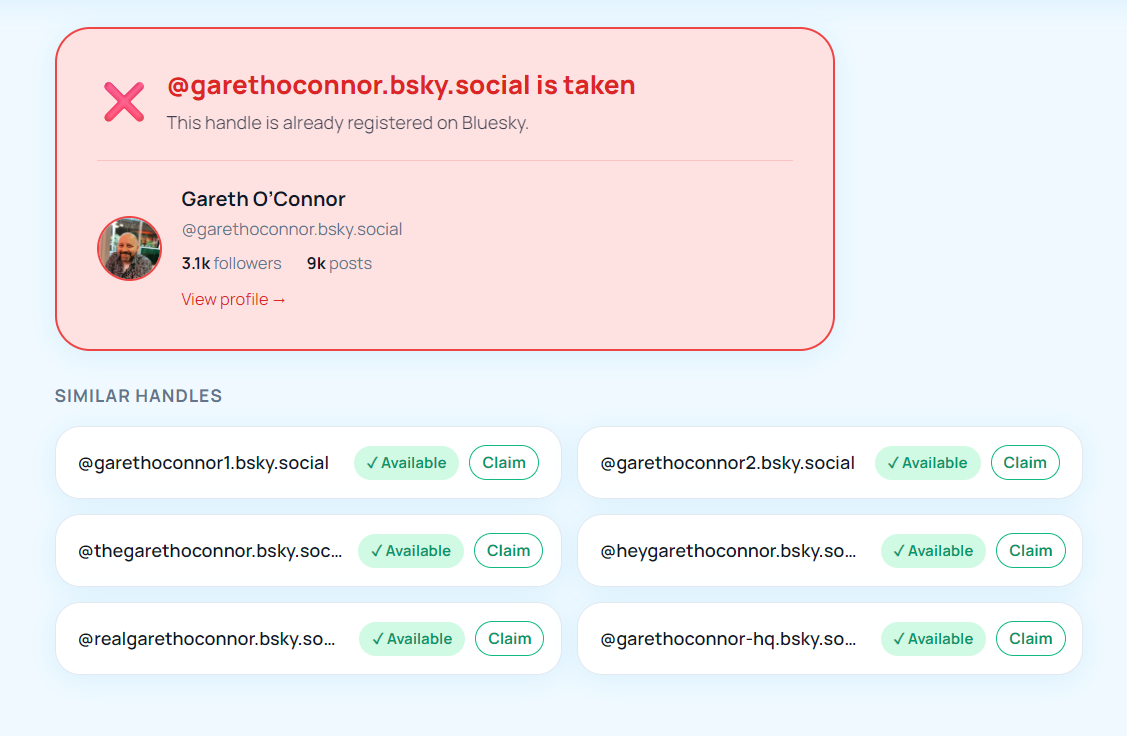
Similar handles
How it works
Three steps to find your perfect Bluesky handle.
Type a username
Enter the username you want, just the part before .bsky.social. No @ needed.
See instant results
The tool checks the Bluesky AT Protocol in real time and shows if it's free or already claimed, plus who owns it.
Claim or pick an alternative
If it's available, click Claim on Bluesky. If taken, pick one of the suggested alternatives shown below.
Frequently asked questions
How to use the Bluesky Handle Checker
Find and claim the perfect Bluesky username, a step-by-step guide.
The BskySuite Handle Checker queries the live AT Protocol identity API to see whether a username is already linked to a Bluesky account. Here's how to use it effectively and what to do once you find an available handle.
Step 1, Enter a username
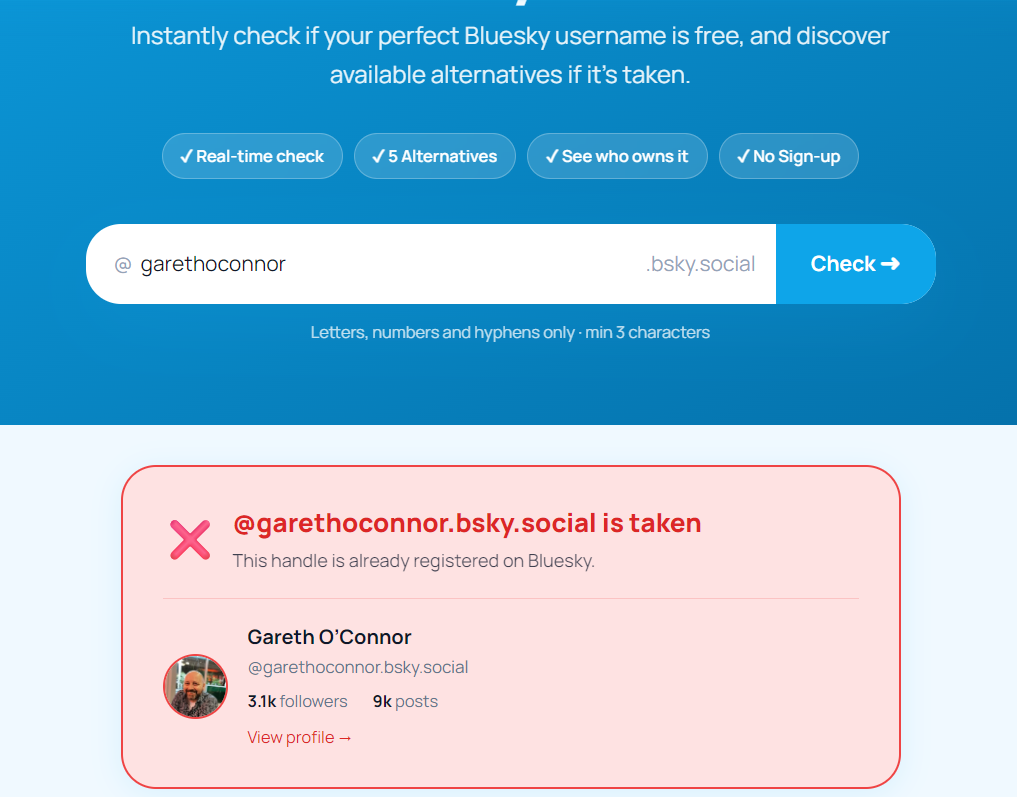
Type the username you want to check, without the @, into the search field and click Check. The tool returns a live result in under a second. No sign-in required.
Understanding Bluesky handle formats
Bluesky supports two kinds of handles. Default handles follow the pattern username.bsky.social, free and created at sign-up. Custom domain handles are any domain you own, such as yourname.com or blog.yoursite.org. Setting one up requires adding a _atproto DNS TXT record at your domain registrar. The Handle Checker validates .bsky.social handles; custom domain availability depends on domain registration.
Handle rules
Bluesky handles are 3–20 characters, lowercase alphanumeric and hyphens only, no underscores, no spaces. If your first choice is taken, try a creative variation: a meaningful prefix (the, real, get), a relevant suffix (hq, official), or a short abbreviation of your full name or brand.
Choosing a good handle
Keep it short. Shorter handles fit better in posts and are easier to type from memory. Match your existing brand. If you're already yourname on other platforms, claiming the same handle on Bluesky reduces confusion and makes you easier to find. Avoid numbers at the end, yourname123 signals "late adopter." Think about custom domains: if you own yourname.com, using it as your Bluesky handle acts as built-in verification, no blue checkmark needed.
Registering once you find an available handle
BskySuite can't register handles, that happens at bsky.app/settings or any AT Protocol-compatible client. Once you spot an available handle, register it immediately; availability can change in seconds if someone else is checking at the same time.
How handles actually work on Bluesky
Understanding what a handle is on Bluesky helps explain why it behaves differently from a username on other platforms. Your real identity on the AT Protocol is a DID, a decentralised identifier that looks something like did:plc:abc123. That string is your permanent account identity, and it never changes. Your handle is a human-readable alias that points at your DID, rather like a domain name pointing at an IP address.
This design has a practical consequence that surprises people coming from other networks: you can change your handle without losing your account, your followers, your posts, or your history. Your DID stays constant underneath. It also means a handle you abandon becomes available for someone else to claim, so if you change handles and care about the old one, it is worth understanding that you are releasing it.
Custom domains as free verification
One of the more genuinely useful features Bluesky offers is using a domain you own as your handle. If you control yourname.com, you can make your Bluesky handle @yourname.com by adding a DNS record. Because only the owner of a domain can create records for it, this doubles as a form of self-verification. Anyone can see that the account controls the domain, which is why many news organisations, companies, and public figures on Bluesky use domain handles rather than default ones.
There is no fee to Bluesky for this beyond whatever you already pay to register the domain, and no application or approval process. The setup involves adding a single _atproto TXT record at your registrar and then confirming it in Bluesky's settings. We walk through the full process for every major registrar in our guide to setting a custom domain handle on Bluesky.
Why a handle might show as taken
If the checker reports a handle is unavailable, there are a few likely explanations. Most often the handle simply belongs to an existing account, in which case the tool shows you the profile so you can see who holds it. Sometimes a handle is held by an account that appears inactive; Bluesky does not currently release handles from dormant accounts, so an abandoned-looking profile still holds its name. Very short handles, common first names, and single dictionary words were largely claimed early in Bluesky's growth, so expect those to be gone.
If a handle is available, treat that result as a snapshot rather than a reservation. Nothing holds it for you, and popular names can be claimed by someone else within minutes. If you have found one you want, register it before doing anything else.
Common mistakes when picking a handle
- Choosing something hard to say aloud. If you cannot tell someone your handle in conversation without spelling it, it will be harder to share.
- Over-specific naming. A handle tied to one project or job becomes awkward when your focus changes. Slightly broader names age better.
- Inconsistency across platforms. Using a different name everywhere makes you harder to find and weakens recognition.
- Ignoring the domain option. If you already own a relevant domain, it is usually a stronger handle than anything at .bsky.social.
- Hyphen overload. Hyphens are allowed but make handles harder to type and easier to mistype.
Privacy and how this tool works
The checker requires no account and no login. It queries Bluesky's public identity resolution endpoint, the same one the official app uses to turn a handle into a DID, and reports whether that lookup succeeds. It never sees or asks for your password, stores nothing you type, and cannot make any change to any account. Checking a handle is a read-only operation that is invisible to the handle's owner.
Frequently asked questions
Can I change my Bluesky handle later?
Yes. Handles on Bluesky are aliases pointing at your permanent DID, so you can change yours in settings without losing followers, posts, or account history. Your old handle then becomes available to others.
Is it free to check handle availability?
Yes, completely free with no account and no limit on how many handles you check.
Can I reserve a handle for later?
No. Bluesky has no reservation system, and neither does this tool. Availability is first come, first served, so register a handle as soon as you find one you want.
Does using a custom domain cost anything?
Bluesky does not charge for custom domain handles. You only pay your normal domain registration fee to whoever you bought the domain from.
What happens to my old handle if I switch to a domain?
Your previous .bsky.social handle is released and can be claimed by someone else. Some people keep the old account name in their display name or bio for a while so followers are not confused by the change.