One of Bluesky's most underrated features is the ability to use any domain you own as your handle. Instead of @yourname.bsky.social, you can be @yourname.com, and that domain acts as proof of identity without requiring any centralised verification authority. It's the AT Protocol doing something Twitter's blue checkmark never could.
The good news: setting it up takes about five minutes and zero code. The bad news: DNS is involved, so let's do it properly.
Why Use a Custom Domain Handle?
There are two compelling reasons. First, identity: if you already have a presence at yourname.com, making that your Bluesky handle means anyone can see that the account is legitimately you. No third-party verification required, the DNS record does the work. Second, permanence: your domain outlasts any specific platform. Even if you move to a different AT Protocol server, your domain handle stays the same.
Quick Answer: Add a DNS TXT record at your domain registrar with the host _atproto and the value Bluesky gives you, then verify in Settings. That's it.
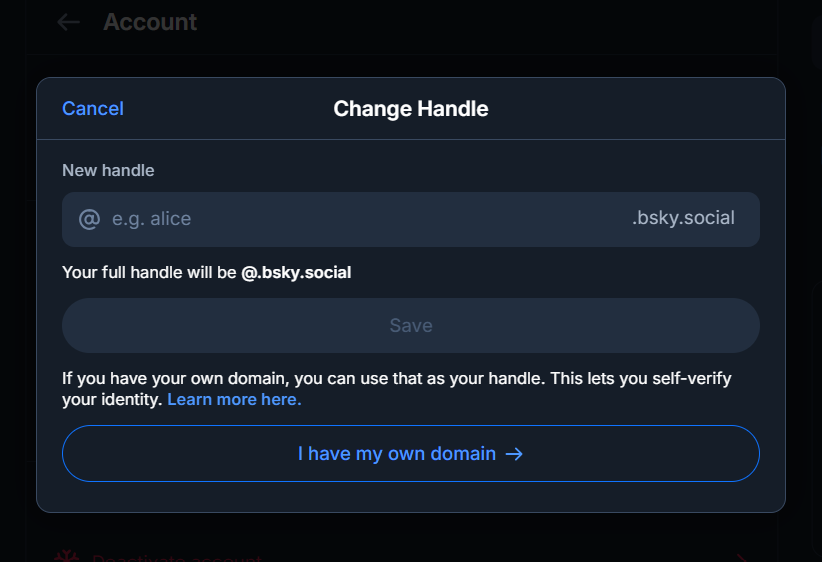
Step-by-Step Setup
Open Handle Settings on Bluesky
On bsky.app, tap your profile picture in the top-left, then go to Settings > Change Handle. At the bottom of the modal, select "I have my own domain" and type in the domain you want to use (e.g. yourname.com).
Copy your verification string
Bluesky will show you a verification string that looks like did=did:plc:xxxxxxxxxxxx. Copy the entire value, you'll need it in the next step.
Add a TXT record at your registrar
Log into your domain registrar's DNS management panel and add a new TXT record:
Host / Name: _atproto
Value: did=did:plc:xxxxxxxxxxxx
TTL: 300 (or "Automatic")
The host field is always _atproto (not _atproto.yourname.com, your registrar adds the domain automatically).
Click "Verify DNS Record" in Bluesky
Go back to the Bluesky handle settings and click the verify button. If DNS has propagated, you're done and your handle switches immediately.
Registrar-Specific Notes
Cloudflare
Set the record type to TXT, name to _atproto, and content to your did string. Leave the Proxy toggle off (DNS only, grey cloud). Propagates in seconds.
Namecheap
In Advanced DNS, click "Add New Record." Choose TXT Record, set Host to _atproto, and Value to your did string. TTL can stay at "Automatic." Propagates within 5–20 minutes.
GoDaddy
In the DNS management panel, select Add → TXT. Set Name to _atproto, Value to your did string, TTL to 1 hour. GoDaddy can take 20–60 minutes to propagate.
Google Domains / Squarespace DNS
Add a custom record, type TXT, host _atproto, data = your did string. Typically propagates within a few minutes.
Using a Subdomain as Your Handle
You can also use a subdomain, for example, @blog.yoursite.com or @team.company.com. The process is the same, but the TXT record host becomes _atproto.blog (for blog.yoursite.com). Bluesky resolves handles against their full hostname, so subdomains work exactly the same as apex domains.
Common Problems and Fixes
Verification fails immediately, DNS hasn't propagated yet. Wait 5 minutes and try again. Cloudflare is usually instant; GoDaddy can take up to an hour.
"That domain is already taken", Another Bluesky account is using that domain as a handle. You'll need to use a different domain or subdomain.
Record shows but verification still fails, Double-check the TXT host is exactly _atproto (no extra dots) and the value starts with did=.
My old .bsky.social handle broke, It didn't. Your old handle continues to work as an alias and all your existing followers are unaffected. Your domain is now your primary handle.
Check if a handle is available first
Before setting up DNS, confirm your desired username isn't already taken on Bluesky.
Check Handle Availability →How Bluesky Actually Verifies Your Domain
It helps to know what happens when you press that verify button, because almost every failure makes sense once you do.
Your account is not really called @yourname.com. Underneath, every Bluesky account is a DID, a permanent identifier that looks like did:plc:abc123.... That string never changes, no matter how often you rename yourself. A handle is only a human-readable label pointing at it.
So when Bluesky verifies a domain, it is answering one question: does this domain publicly claim to belong to this DID? It performs a DNS lookup for a TXT record at _atproto.yourdomain.com and checks whether the value matches your DID. If it does, only someone who controls the domain's DNS could have put it there, which is proof enough.
That is why the check needs no approval from anybody. There is no review queue and no verification team. The domain vouches for you, and Bluesky simply reads the answer. It is also why the whole thing breaks the moment the record disappears, which we come back to below.
The HTTPS Method When You Cannot Edit DNS
DNS is not always available to you. Some managed hosts, free subdomains and locked-down company domains do not let you add arbitrary TXT records. The AT Protocol has a second route for exactly this case.
Instead of a DNS record, you can serve a plain text file at this address:
The file contains your DID and nothing else. No JSON, no markup, no trailing blank line if you can avoid it, just did:plc:abc123... as its entire contents. It must be served over valid HTTPS and return a plain 200. Bluesky follows redirects poorly here, so serve it directly rather than bouncing through a URL shortener or a redirect rule.
This route suits anyone already running a site on Netlify, Vercel, GitHub Pages or a static host, where dropping a file into a folder is easier than reaching the DNS panel. Note that it only works for a domain you can publish files on. If your domain points at a service you do not control, DNS remains the only option.
Checking the Record Before You Hit Verify
Rather than pressing verify repeatedly and hoping, you can ask the internet directly whether your record is live. This turns a guessing game into a yes or no answer.
On macOS or Linux, open a terminal and run:
On Windows, the equivalent is:
If you prefer not to touch a terminal, any public DNS lookup tool will do the same job in a browser. What you are looking for is a single line containing did=did:plc: followed by your identifier. Here is how to read what comes back.
| Result | Meaning | Fix |
|---|---|---|
| Nothing returned | The record has not propagated, or it was saved under the wrong host | Wait, then confirm the host field reads exactly _atproto |
| Wrong DID shown | An old record from a previous attempt is still in place | Delete the stale record; do not add a second one |
| Two records returned | Duplicate TXT entries confuse the lookup | Remove all but the correct one |
Value missing did= | Only the identifier was pasted, without the prefix | The value must begin with did= |
| Correct value, verify still fails | Cloudflare proxying is on, or the record sits on the wrong domain | Set the record to DNS only, grey cloud |
If dig shows the right value, Bluesky will accept it. If it does not, no amount of pressing verify will help.
What Happens to Followers, Links and Your DID
This is the question that stops most people from trying, so it is worth being precise.
Your followers do not move, because you do not move. Remember that the DID is the real account. Changing your handle relabels the same account, so every follower, post, like and reply stays attached. Nobody has to refollow you and nobody is notified that something broke.
Old links keep working. A post URL contains your handle, so a link shared under your previous handle looks stale. In practice Bluesky resolves it to the same underlying record, so old links continue to open the right post.
Mentions update themselves. An @mention written before the change is stored against your DID rather than the text, so it points at your new handle without anyone editing anything.
The one visible change is cosmetic. Your old .bsky.social name is released back into the pool once you switch, so somebody else can eventually claim it. If that name matters to you, consider keeping it rather than switching, or accept that it may not be there if you change your mind later.
Choosing a Domain, and What to Avoid
Any domain you control will technically work, but some choices age better than others.
A domain you already use for a site or email is the strongest option, because the identity claim is doing real work. Someone who knows your site immediately recognises the handle. A domain registered purely to look official does the opposite of what you intended, since anyone can buy one.
Length matters more than it seems. Your handle appears next to every post and reply you write, and a long domain is quietly annoying to read and to type. Short beats clever.
Avoid free subdomains from services that may withdraw them, and avoid anything implying an affiliation you do not have. A handle that reads like an official company account is the kind of thing that attracts an impersonation report, and impersonation is one of the few things Bluesky acts on quickly.
Not sure whether the name you want is free? Our Bluesky handle checker tells you in a second whether a handle is taken, before you spend anything on a domain.
If the Domain Expires or You Sell It
This is the real risk of a domain handle, and it is rarely mentioned.
Your handle depends on a DNS record you control. If the domain lapses, the record vanishes with it. Bluesky periodically rechecks handles, and one that no longer resolves gets marked invalid. Your account, posts and followers are untouched because the DID is unaffected, but your handle reverts to a .bsky.social style name and you lose the domain identity until you fix it.
Two habits prevent this. Turn on auto-renew, and let the registrar keep a payment method that will not expire before the domain does. Second, if you ever sell or transfer the domain, change your handle first. Handing over a domain that still carries your _atproto record means handing the new owner the ability to remove it whenever they like.
Frequently Asked Questions
Do I need to pay for this? You need to own a domain (~$10–20/year). The Bluesky verification itself is free, no paid subscription required.
Will my followers lose me? No. Everyone who follows @yourname.bsky.social will still see your posts. Both handles point to the same DID.
Can I switch back to .bsky.social? Yes. Go back to Settings > Change Handle and delete the custom domain to return to your original handle.
Does this work on the mobile app? Yes, the Settings > Change Handle flow is the same on iOS and Android as it is on the web.
What happens if my domain expires? Your account, posts and followers are safe, because they belong to your DID rather than your handle. But the DNS record disappears with the domain, so Bluesky can no longer verify the handle and it reverts to a .bsky.social style name. Keep auto-renew switched on.
Can I set a domain handle without touching DNS? Yes. Serve a plain text file containing your DID at https://yourdomain.com/.well-known/atproto-did over valid HTTPS. This is often easier if your site runs on a static host.
How do I check the TXT record myself? Run dig +short TXT _atproto.yourdomain.com on macOS or Linux, or nslookup -type=TXT _atproto.yourdomain.com on Windows. You should see a single value starting with did=did:plc:.
Do I lose my followers when I change handle? No. Your followers are attached to your DID, which never changes. Changing the handle only changes the label, so nothing is lost and nobody needs to refollow you.