Most social platforms make one moderation decision and apply it to everyone. You get the rules the company chose, and your only real options are to accept them or leave. Bluesky took a different path. Built on the open AT Protocol, it treats moderation as something you assemble from parts: labelers, mute lists, and block lists that you can mix to match your own comfort level. The result is more control than any mainstream network offers, but it can feel unfamiliar at first. This guide walks through each tool and how to set it up.
Why Bluesky Moderation Works Differently
On Bluesky, moderation is layered rather than monolithic. The company runs a baseline moderation service that handles the clearest violations, such as illegal content and large-scale spam. On top of that baseline, independent services called labelers can annotate posts and accounts. You choose which of those services to subscribe to, and your app combines their signals to decide what to hide, blur, or warn you about.
This matters because no single set of rules suits everyone. One person wants every spoiler hidden, another wants graphic news visible, a third wants a strict filter on harassment. Instead of forcing one answer, Bluesky lets each person build their own. Think of it as moderation you can configure, not moderation that is done to you.
Labelers: Moderation as a Subscription
A labeler is a service that reviews content and attaches labels to it. A label might say a post is spam, contains nudity, is a scam, or belongs to a particular topic. Your app reads those labels and acts on them based on your settings: hide the content entirely, blur it behind a warning, or show a small notice.
The key idea is that labelers are opt-in. You subscribe to the ones whose judgement you trust, the same way you might subscribe to a newsletter. If a labeler becomes too aggressive or too lax for your taste, you unsubscribe and its labels stop affecting your feed. Nothing is locked in.
How to Subscribe to a Labeler
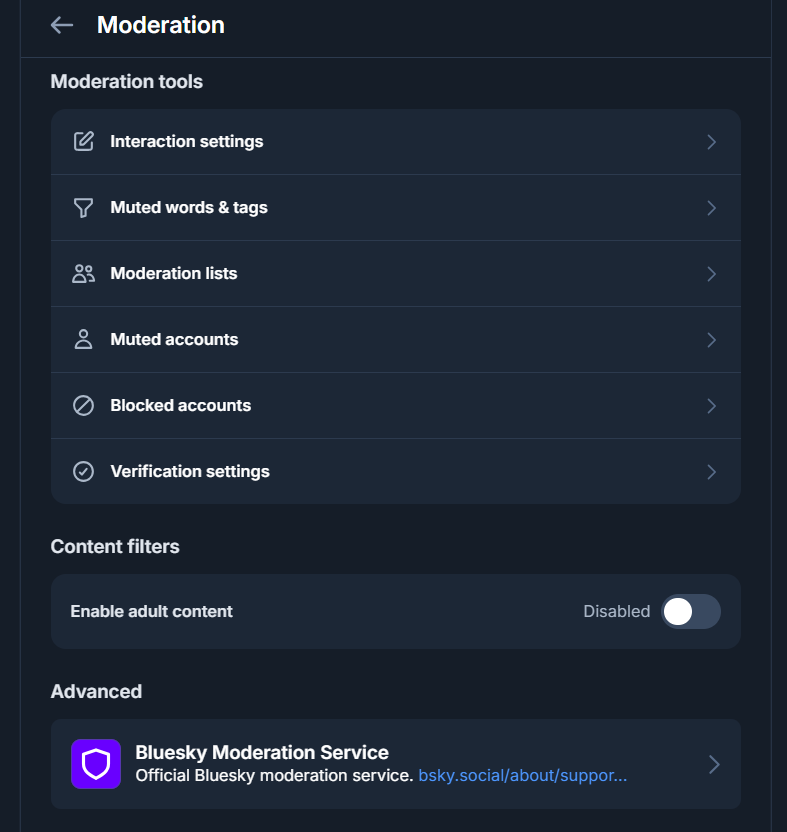
- Open the Bluesky app and go to Settings, then Moderation.
- Scroll to Advanced or Moderation services to see available labelers.
- Tap a labeler to view what it labels and how active it is, then tap Subscribe.
- For each label the service offers, choose your action: Off, Warn, or Hide.
You can also find labelers by visiting their account profile directly. Many labelers run as normal Bluesky accounts, so when you open the profile you will see a subscribe option if that account operates a labeling service.
Good to know: The baseline Bluesky Moderation service is on by default and cannot be fully removed, because it covers legal and safety basics. Everything beyond that baseline is your choice.
Mute Lists vs Block Lists
Lists are the other half of Bluesky moderation. A list is simply a collection of accounts, and you can apply it as either a mute list or a block list. The difference between the two is significant, so it is worth being precise.
Mute List
- Hides posts from listed accounts in your feeds
- Silent: nobody is notified
- You can still visit their profile directly
- They can still reply, you just will not see it
- Best for clutter, spoilers, or low-quality accounts
Block List Stronger
- Fully blocks every account on the list
- They cannot see your posts or reply to you
- Interactions are severed in both directions
- Blocks are public on the open network
- Best for harassment and bad-faith accounts
Muting is the gentle option. It quietly removes noise without confrontation, and the muted person never knows. Blocking is the firm option. It cuts off interaction entirely, which is the right call for harassment or accounts acting in bad faith. Because the AT Protocol stores data openly, blocks are technically visible on the network, so treat blocking as a public action rather than a secret one.
Creating Your Own Moderation List
One of Bluesky's most powerful features is that you can build and share your own lists. If you curate a list of spam accounts or coordinated trolls, others can subscribe to it and benefit from your work. This turns moderation into a community effort rather than a solo grind.
- Go to your Profile, then open the Lists tab.
- Tap New List and choose Moderation List.
- Give it a clear name and description so subscribers know its purpose.
- Add accounts by searching for them or using the add-to-list option on a profile.
- Once built, choose Mute accounts or Block accounts to apply it to yourself.
- Share the list link if you want others to subscribe.
Keep moderation lists separate from curation lists. A User List is for building feeds of people you want to read, while a Moderation List is for muting or blocking. Mixing the two leads to confusion later.
Content Filters and Adult Content Settings
Beyond labelers and lists, Bluesky offers built-in content filters in the Moderation settings. These let you set how the app treats categories such as adult content, graphic media, and other sensitive material. You can choose to show, warn, or hide each category. If you have not enabled adult content, it stays hidden regardless of labels, which is a sensible default for most people.
It is worth spending five minutes in Settings to review these toggles when you first join. The defaults are conservative, so if your feed feels overly filtered, this is usually where to adjust it.
Putting It All Together
A practical setup for a typical user looks like this: keep the baseline Bluesky moderation on, subscribe to one or two well-regarded labelers for spam and harassment, mute a personal list of spoiler or clutter accounts, and reserve blocking for genuine bad actors. From there you can tune as you go. The system is designed to be adjusted, not set once and forgotten.
The bigger point is that Bluesky gives ordinary users tools that used to belong only to platform employees. You are not at the mercy of a single opaque algorithm deciding what is acceptable. You build the experience you want, and you can change it the moment it stops working for you.
Want to see who is actually engaging with you?
BskySuite's free Profile Analytics shows your top posts, engagement rate, and best posting times so you can focus on the people who matter. No sign-up needed.
Analyse my profile →Frequently Asked Questions
What is a labeler on Bluesky?
A labeler is a moderation service that annotates posts and accounts with labels such as spam, rude, or topic warnings. You subscribe to labelers you trust, and your app uses their labels to hide, blur, or warn on content. Labelers are the core of Bluesky's composable moderation system.
What is the difference between a mute list and a block list?
A mute list silently hides posts from everyone on the list without notifying them, and you can still see their profiles directly. A block list fully blocks every account on it, so they cannot see your posts, reply, or interact, and blocks are visible. Both are shareable lists that anyone can subscribe to.
Can I create my own moderation list?
Yes. In the Bluesky app, go to your profile, open Lists, and create a new Moderation List. Add accounts to it, then choose to mute or block everyone on the list. You can keep it private or share it so others can subscribe to the same list.
Does blocking someone notify them?
Bluesky does not send a notification when you block someone, but blocks are public on the network because the data is stored openly on the AT Protocol. Someone can discover they are blocked if they look, but they will not get an alert at the moment you block them.