Skip the reading, grab your image now
Paste a Bluesky post link into our free Bsky image downloader and save every image at full quality in seconds. No account required.
⬇️ Open the free image downloader →If you have ever tried to save a photo from Bluesky, you already know the built-in options are limited. Right-clicking often saves a small preview, and screenshots lose quality and crop awkwardly. A dedicated Bsky image downloader solves this by pulling the original image file the poster uploaded, so you get the exact photo at its full resolution. This guide explains how it works, how to use it on any device, and the etiquette to keep in mind before you save someone else's work.
What Is a Bsky Image Downloader?
A Bsky image downloader is a small tool that takes a Bluesky post link and returns the full-quality image files attached to that post. Bluesky is built on the open AT Protocol, which means public posts and their media are accessible through a public API. The downloader uses that public data to locate the original image and hand it to you as a normal file, rather than the compressed preview you see while scrolling.
The practical difference is quality. A screenshot is capped at your screen resolution and includes interface clutter like buttons and text. A real downloader gives you the clean, original image exactly as it was uploaded, with no watermark added.
How to Download an Image from Bluesky in 3 Steps
Using the BskySuite Bsky image downloader takes less than a minute and works the same way on every device.
- Copy the post linkOpen the Bluesky post that contains the image. Tap the share or more icon, then choose Copy link to post.
- Paste it into the downloaderOpen the free BskySuite downloader and paste the link into the input box.
- Download the imageThe tool fetches every image in the post at full resolution. Tap Download to save each one to your device.
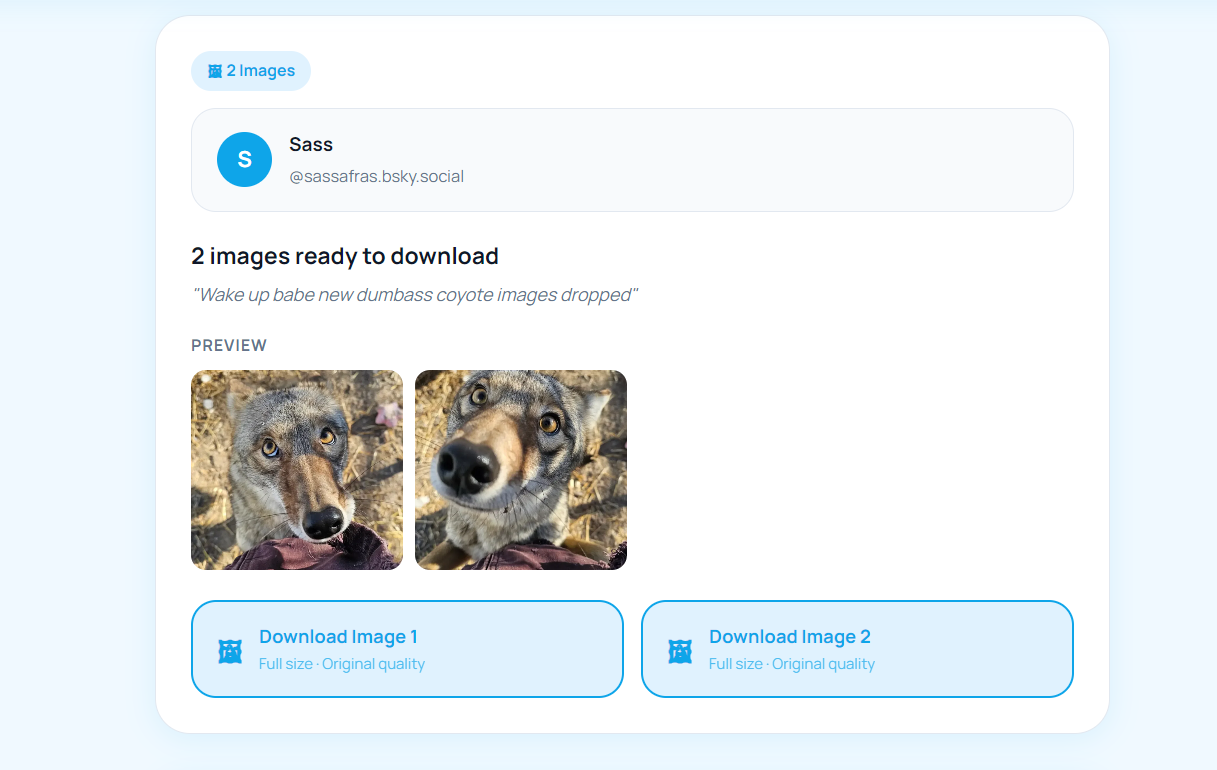
Multiple images? Bluesky posts can hold up to four images. The downloader detects all of them, so you can save the whole set from a single link instead of grabbing them one at a time.
Download Bluesky Images on Desktop
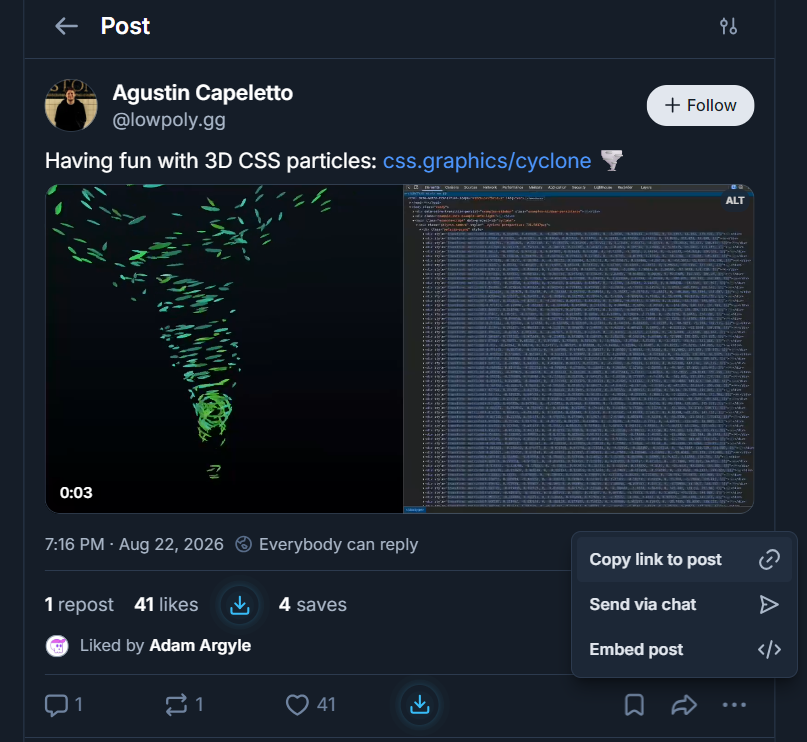
On a computer, the process is effortless. Copy the post link from the Bluesky web app or your browser address bar, paste it into the downloader, and each image appears with its own download button. Files save straight to your Downloads folder in their original format, ready to use in documents, presentations, or your own archive.
Download Bluesky Images on iPhone and Android
A browser-based Bsky image downloader is especially handy on mobile, where saving photos from social apps is usually awkward. Here is the flow on a phone:
- iPhone: In the Bluesky app, tap the share icon on the post and choose Copy Link. Open the downloader in Safari, paste, then long-press the result and choose Save to Photos, or use the download button.
- Android: Tap the post menu, choose Copy Link, open the downloader in Chrome, paste, and tap Download. The image lands in your Downloads or Gallery.
Because everything runs in the browser, there is no app to install and nothing to sign into.
Downloader vs Screenshot: Why Quality Matters
Some people still screenshot images out of habit. For a quick, low-stakes save that is fine, but the difference in quality is real.
Screenshot
- Limited to your screen resolution
- Captures interface clutter and cropping
- Compresses and softens fine detail
- Manual cropping needed afterwards
Bsky Image Downloader Full quality
- Saves the original uploaded file
- No buttons, text, or borders
- Full resolution and detail preserved
- Grabs all images in the post at once
Is It Safe and Free?
Yes on both counts. The BskySuite downloader is free with no account, and it never asks for your Bluesky password because it only reads public data through the AT Protocol. There is no watermark, no sign-up wall, and no limit on how many images you can save. Everything happens in your browser.
Is It Legal to Download Images from Bluesky?
Saving a public image for personal use, like keeping a reference photo or a meme, is generally fine. What matters is what you do next. The image is still the creator's work. Do not repost it as your own, and do not use someone else's images commercially without permission or credit. When in doubt, ask the poster or simply credit them. Respecting creators keeps the whole community healthy.
What Image Quality and Format You Actually Get
When you download through a Bsky image downloader you receive the file Bluesky stores, not a re-compressed copy. In practice that means a JPEG at the resolution the poster uploaded. Bluesky does apply its own processing when an image is first posted, so a 6000 pixel wide camera original will already have been resized before it ever reaches your device. What you get is the largest version Bluesky itself serves, which is the same file anyone viewing the post at full size is looking at.
This distinction matters because it sets a realistic expectation. A downloader cannot recover detail that Bluesky removed at upload time, and no tool can, whatever it claims. What it can do is avoid adding a second round of quality loss on top. Every screenshot, re-save, or re-upload compounds compression artefacts, so starting from the served original is always the cleanest possible copy available to you.
One related detail is the difference between the thumbnail and the full image. The small preview you see while scrolling is a separate, heavily compressed file. Some browser tricks and right-click methods grab that thumbnail by mistake, which is why images saved that way often look soft when opened. A proper downloader resolves the full-size version instead.
Downloading Several Images from One Post
A single Bluesky post can carry up to four images, and this is where manual methods become tedious. Rather than opening each image, right-clicking, and saving one at a time, the downloader detects every image attached to the post and gives each one its own download button.
They are listed in the same order they appear in the post, so the first button corresponds to the first image. You can save one, several, or all of them. There is no limit and no need to paste the link again between images, because the whole post is loaded once and every attachment is resolved from that single request.
If a post contains a mix of media, for example an image alongside a link preview with its own thumbnail, each downloadable item appears separately so you can pick exactly what you want.
What You Cannot Download, and Why
Being clear about limits is more useful than overpromising, so here is what is genuinely out of reach:
- Private or protected accounts. These posts are never served through Bluesky's public API. Because the tool uses no login, there is nothing for it to retrieve. No downloader can access them, and any service claiming otherwise is either misrepresenting what it does or asking for credentials you should not hand over.
- Deleted posts. Once a post is removed, the media is gone from Bluesky's servers. There is no cache to recover it from.
- Entire profiles at once. The tool handles one post link per request. It is not a bulk scraper or an archiving service, deliberately.
- Images from other platforms. A link preview pointing at an external site shows a thumbnail Bluesky generated. The original image lives on that other site, not on Bluesky.
Troubleshooting: When an Image Will Not Save
Most failed downloads come down to a handful of causes, and each has a straightforward fix.
- Nothing loads after pasting the link. Check that you copied the link to the individual post rather than the profile or your home feed. A valid post link contains /post/ in the URL.
- The post is from a private account. Nothing can be retrieved. Open the post in a browser while logged out to confirm whether it is genuinely public.
- On iPhone the image opens instead of downloading. This is standard Safari behaviour rather than a fault. Press and hold the image, choose Save to Photos, or use the share sheet to send it to Files.
- The file saved with no extension. Rename it and add .jpg. The image data is intact.
- Only a small blurry version saved. You almost certainly saved the thumbnail by right-clicking the preview rather than using the download button.
- It worked yesterday and not today. Bluesky's servers occasionally rate-limit under heavy load. Waiting a minute and retrying usually resolves it.
Alt Text, Credit, and Using Images Well
Two things are worth knowing once the image is on your device. The first is alt text. Many Bluesky users write careful image descriptions for people using screen readers, and that text is attached to the post rather than embedded in the image file. When you download the picture, the description does not travel with it. If you are reusing an image somewhere it matters, copying the original alt text across is a small courtesy that keeps the image accessible.
The second is credit. A public post is not a licence to reuse the work, and the strength of Bluesky's creative communities depends on that being respected. Saving something for personal reference asks nothing of you. Republishing it does. Where you can, link back to the original post rather than only naming the account, since a link lets people find the creator and follow them. If an image is central to something you are publishing, asking first costs a message and almost always gets a yes.
Ready to save a Bluesky image?
Our free Bsky image downloader also handles videos and GIFs from any public post. No login, no watermark, works on every device.
⬇️ Try the free downloader now →Frequently Asked Questions
What is a Bsky image downloader?
A Bsky image downloader is a tool that saves the full-quality image files attached to a Bluesky post. You paste the post link, and it retrieves the original images through Bluesky's public AT Protocol API, so you avoid a lower-quality screenshot.
Is the BskySuite Bsky image downloader free?
Yes. It is completely free, needs no account or login, and adds no watermark. It runs in your browser on both mobile and desktop.
Do I need to log in to download Bluesky images?
No. Public Bluesky posts are served through the open AT Protocol, so the downloader can fetch images from any public post without your login. You never enter your Bluesky password.
Can I download images from Bluesky on my phone?
Yes. The downloader works in mobile browsers on iPhone and Android. Copy the post link in the Bluesky app, paste it into the tool, and save the image to your camera roll or downloads folder.
Does it save images in full quality?
Yes. Unlike a screenshot, which is limited to your screen resolution, the downloader retrieves the original uploaded file, so you get the full quality the poster shared.
Is it legal to download images from Bluesky?
Downloading a public image for personal use is generally fine, but the image is still the creator's work. Do not repost or use someone else's images commercially without permission or credit.
Can I download all four images from one Bluesky post?
Yes. A post can hold up to four images, and each one gets its own download button in the order it appears. You can save one, several, or all of them without pasting the link again.
Why did my downloaded image save without a file extension?
Occasionally a browser saves the file without .jpg on the end. The image data is intact, so simply renaming the file and adding the extension fixes it.
Does the alt text get saved with the image?
No. Alt text is attached to the Bluesky post rather than embedded in the image file, so it does not travel with the download. If you reuse the image somewhere accessibility matters, copy the description across yourself.
Why does my saved image look blurry?
That usually means the thumbnail was saved rather than the full image. The small preview shown while scrolling is a separate, heavily compressed file. Use the download button to get the full-size version.