If you want to schedule posts on Bluesky, there is one thing to know up front: Bluesky itself does not have a built-in scheduling feature. There is no button in the app to set a post for later. The good news is that scheduling is still completely possible through third-party tools, and Bluesky has officially partnered with one of them. This guide walks through exactly how to schedule Bluesky posts, which tools to use, how to connect your account safely, and how to pick the right times to post.
Quick answer
- Native scheduling: Bluesky has none built in as of 2026.
- Official partner: Buffer, announced by Bluesky in 2024, supports scheduling and crossposting.
- How to connect: use a Bluesky app password, not your main password.
- Cost: Buffer has a free plan that covers basic scheduling.
- Bonus: schedule Bluesky posts alongside other social networks in one place.
Does Bluesky have a built-in scheduler?
No. As of 2026, neither the official Bluesky app nor the web version includes a native option to schedule posts. When you write a post, your only choice is to publish it immediately. This is a common question because most people arrive expecting a "schedule" button like the ones on some other platforms, and there simply is not one yet.
That does not mean you are stuck posting live every time. Because Bluesky is built on the open AT Protocol, third-party tools can connect to your account and publish on your behalf at a time you choose. That is how every scheduling workflow on Bluesky works today.
How to schedule Bluesky posts with Buffer
Buffer is the most established option because Bluesky officially partnered with it. With Buffer you can plan and organize your Bluesky posts alongside your other social media content, then let Buffer publish them automatically at the scheduled time. Here is the full process.
- Create a Buffer accountSign up at buffer.com. The free plan is enough to start scheduling.
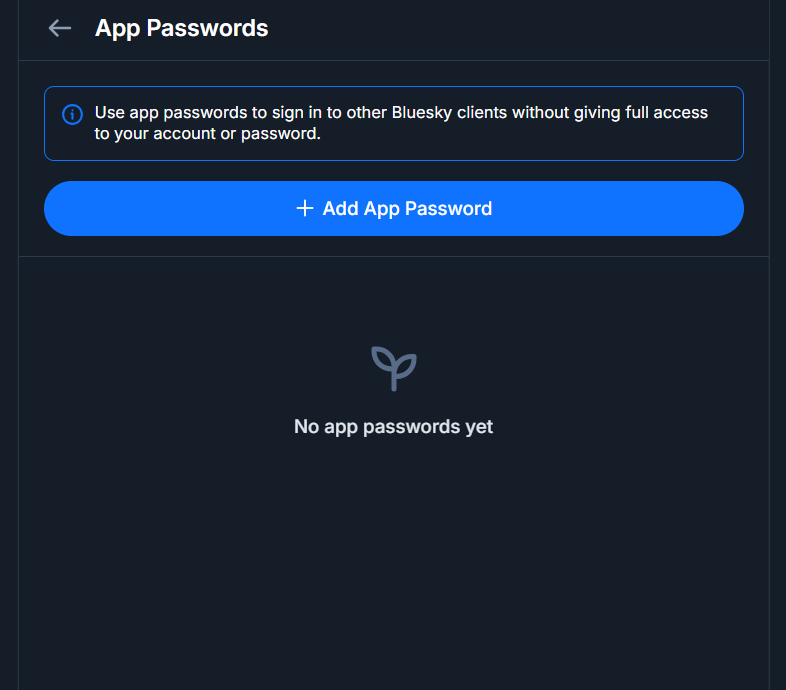
- Create a Bluesky app passwordIn Bluesky, go to Settings, then Privacy and Security, then App Passwords, and create a new one. Copy it.
- Connect Bluesky to BufferIn Buffer, add a new channel, choose Bluesky, and enter your handle and the app password you just created.
- Compose and scheduleWrite your post, pick a date and time, and click Schedule. Buffer publishes it to Bluesky automatically when the time comes.
Why an app password? An app password lets a tool like Buffer post for you without ever seeing your real Bluesky password. You can revoke it any time in Settings, and it instantly cuts off that tool's access without affecting your account.
Other tools to schedule Bluesky posts
Buffer is not the only option. Because the AT Protocol is open, several tools now support Bluesky scheduling. Which one fits depends on whether you want an all-in-one social manager or a Bluesky-focused client.
- Buffer: the official partner, best if you also manage other social networks in one dashboard.
- Deck-style clients: tools like deck.blue offer scheduling inside a TweetDeck-style Bluesky interface, which suits power users who live in Bluesky. See our roundup of the best Bluesky clients and apps.
- Other social schedulers: a growing number of general social media schedulers have added Bluesky support. The setup is almost always the same: connect with an app password, then schedule.
Buffer vs a Bluesky-only client
The right tool depends on how you work.
Buffer (all-in-one)
- Schedule Bluesky next to other networks
- Crosspost the same content everywhere
- Central calendar and queue
- Best for brands and multi-platform users
Bluesky-only client Focused
- Schedule inside a Bluesky-first interface
- Deck columns for feeds and drafts
- Feels native to Bluesky
- Best if Bluesky is your main platform
Crossposting: schedule Bluesky alongside other platforms
One of the biggest reasons to use a scheduler is crossposting. With a tool like Buffer, you can write once and schedule the same post to Bluesky and your other networks at the same time, so you keep a consistent presence without switching between apps. This is especially useful if you are moving to Bluesky but still maintain an audience elsewhere, because you can keep both active from a single calendar.
Best times to schedule your Bluesky posts
Scheduling only helps if you post when your audience is active. Rather than guessing, look at your own data. Our free Bluesky Profile Analytics tool shows the days and times your posts have performed best, so you can line up your scheduled queue with the windows that actually get engagement. A few general habits also help:
- Post consistently. A steady rhythm beats occasional bursts. Scheduling makes consistency easy.
- Match your audience's time zone, not just your own, especially if your followers are international.
- Space posts out. Queue them across the day rather than dumping several at once.
- Leave room to be live. Schedule your evergreen posts, but still reply and join conversations in real time. For more, see our guide on growing your Bluesky following.
Find your best times to post
BskySuite's free Profile Analytics shows your top posts, engagement rate, and the best days and times to post, so your scheduled queue lands when people are watching. No sign-up needed.
Analyse my profile →Can you schedule Bluesky posts from your phone?
Yes. Because scheduling happens inside the third-party tool rather than the Bluesky app, you can do it wherever that tool runs. Buffer, for example, has both a web dashboard and mobile apps for iOS and Android, so you can queue Bluesky posts from your phone exactly as you would on a computer. The Bluesky app itself still has no schedule button, but you never need it: you compose and queue everything in your scheduler, and it publishes to Bluesky for you. That makes it easy to line up a week of content from your phone in a spare moment.
Mistakes to avoid when scheduling Bluesky posts
Scheduling is powerful, but a few habits can undermine it:
- Scheduling and disappearing. A queue is not a substitute for showing up. Bluesky rewards genuine conversation, so keep replying and engaging live.
- Over-automating. If every post is scheduled and identical across platforms, it reads as robotic. Tailor at least some posts to Bluesky's tone.
- Ignoring the results. Check which scheduled posts actually landed, then adjust your times and topics based on what worked.
- Forgetting time zones. A post set for 9 a.m. your time may reach your audience at 3 a.m. theirs. Schedule around your followers, not just yourself.
- Leaving old app passwords active. If you stop using a tool, revoke its app password so nothing keeps posting access to your account.
Is it safe to connect a scheduling tool to Bluesky?
Yes, as long as you connect with an app password rather than your main password. Bluesky created app passwords precisely for this: you generate a separate password, hand it to a trusted tool, and revoke it whenever you want without changing your real credentials. Stick to reputable tools, use a unique app password for each one, and review your app passwords in Settings from time to time to remove any you no longer use.
What should you schedule on Bluesky?
Scheduling works best for content that does not depend on the moment. Good candidates to queue in advance include:
- Announcements and links to your blog, products, or projects
- Recurring series, such as a weekly tip or a daily prompt
- Evergreen posts you want seen across different time zones
- Content you batch-write when you have time, then space out
Leave reactive posts, replies, and anything tied to a live moment for real time, because that spontaneity is where Bluesky's culture shines. A strong approach is to schedule a reliable backbone of posts and keep room to jump into conversations as they happen.
Frequently asked questions
Can you schedule posts on Bluesky?
Yes. Bluesky has no built-in scheduler, but you can schedule posts using third-party tools. Bluesky officially partnered with Buffer in 2024, so Buffer is the most established way to plan and schedule Bluesky posts in advance.
Does Bluesky have a native scheduler?
No. As of 2026, the official Bluesky app and website do not include a built-in option to schedule posts. Scheduling is done through third-party tools that connect to your account.
Is it safe to connect Bluesky to a scheduling tool?
Yes, if you use an app password rather than your main password. Bluesky lets you create app passwords in Settings that you can give to a tool and revoke at any time without changing your real password.
Can I schedule and crosspost to other platforms?
Yes. Tools like Buffer let you schedule a Bluesky post alongside posts for other networks, so you can plan your Bluesky content in the same place as the rest of your social media.
Is scheduling Bluesky posts free?
It can be. Buffer offers a free plan that supports scheduling for a limited number of channels and queued posts, which is enough for many individual users. Paid plans add more channels and posts.