Bluesky has grown to tens of millions of users, yet the official app still has no built-in trending page. If you want to know what the Bluesky community is talking about right now, you have to dig. That's exactly the gap that BskySuite Trending fills: a free, real-time dashboard that surfaces trending hashtags, viral topics, popular feeds, the top post of the moment, and suggested accounts worth following, all in one place, no login required.
Why Bluesky Doesn't Have a Native Trending Page
Bluesky was built with a deliberate philosophy: give users control over their own algorithmic experience through custom feeds rather than pushing a single platform-wide trending list. The idea is that what's "trending" is subjective, trending for whom, in which community, on which topic? Rather than forcing a homogeneous trending tab, Bluesky lets users subscribe to curator-built feeds that surface content they actually care about.
That's a great principle, but it creates a real gap for users who simply want to know what's happening across the broader Bluesky community right now, breaking news, viral memes, cultural moments, or a hashtag that suddenly everyone is using. BskySuite solves that by querying the AT Protocol's public API directly and aggregating signals across the whole network in real time.
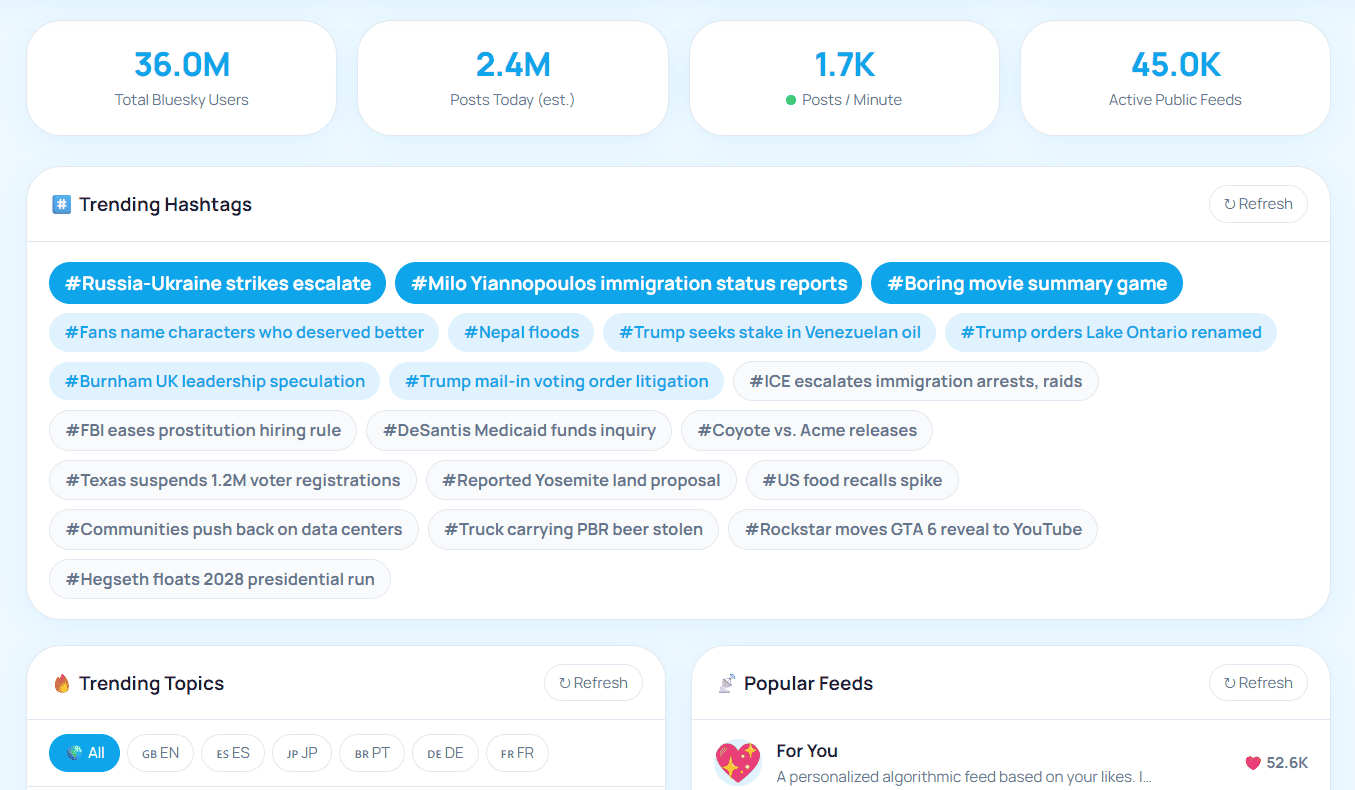
What BskySuite Trending Shows You
Open bskysuite.com/trending and you'll see five distinct sections, each refreshable independently:
Trending Hashtags
The most-used hashtags on Bluesky right now, ranked by volume. Click any tag to search it live on Bluesky.
Trending Topics
Broader conversation subjects dominating the timeline, detected from post clusters, not just hashtag counts.
Trending Feeds
The custom feeds gaining the most subscribers and engagement. Great for discovering new curated communities.
Top Post & Accounts
The single highest-engagement post right now, plus rising accounts worth following across the network.
Each section has a Refresh button so you can get updated data without reloading the full page. The post-per-minute counter at the top of the page gives you a live pulse on overall network activity.
How to Use BskySuite Trending, Step by Step
Go to bskysuite.com/trending
Open bskysuite.com/trending in any browser, mobile or desktop. No account, no sign-up. The page loads live data immediately.
Browse the trending sections
Scroll through Trending Hashtags, Trending Topics, Trending Feeds, Top Post, and Suggested Accounts. Each section loads independently so the page is fast even on a slow connection.
Click to explore on Bluesky
Every hashtag, topic, and post links directly to Bluesky so you can jump straight into the conversation. Feed cards link to the feed's Bluesky page so you can subscribe in one tap.
Refresh for live updates
Hit the Refresh button in any section to pull new data without a full page reload. Come back throughout the day as trends shift, a hashtag that was #3 in the morning may have exploded by noon.
💡 Creator tip: Check Trending Hashtags before you post. Adding a currently-trending tag that fits your content can dramatically increase visibility, you're joining a conversation that's already gaining momentum.
How Bluesky Trending Differs from Twitter/X Trending
If you're coming from Twitter/X, Bluesky trending will feel different in a few important ways:
- No paid promotion. Bluesky has no promoted trends, everything you see in BskySuite Trending is organic, driven purely by real user activity.
- Community-driven topics. Bluesky's community skews toward developers, journalists, creatives, and open-web advocates. Trends often reflect tech, media, politics, and culture in ways that differ significantly from X's broader demographics.
- Feeds over hashtags. A lot of Bluesky curation happens through custom feeds rather than hashtags. The Trending Feeds section surfaces those, something with no equivalent on X at all.
- Open data. Because Bluesky runs on the open AT Protocol, any tool, including BskySuite, can query the same public data the official app uses. There's no API gatekeeping or artificial restriction on what can be surfaced.
Using Trending to Grow Your Bluesky Presence
Trending data is useful beyond just staying informed. Here are three practical ways to use it if you're growing a Bluesky account:
1. Time your posts around trending conversations
When a topic is actively trending, posts about it get seen by far more people. Check BskySuite Trending before you publish, find relevant topics or hashtags, and publish while momentum is still building, not after it's peaked.
2. Discover feeds to submit your content to
Trending Feeds shows which curated feeds are gaining subscribers right now. If your content fits a rising feed's theme, reach out to the feed's curator, getting listed is one of the fastest growth levers on Bluesky.
3. Analyse your engagement in context
Cross-reference trending data with your own post performance using BskySuite Profile Analytics. If a post underperformed on a day when that topic was trending, something in your content or timing missed the mark, now you know what to adjust.
How a Trend Is Detected in the First Place
Trending is not a measure of popularity. It is a measure of change, and the difference explains most of what looks odd about any trending list.
A term used in a steady thousand posts a day is enormously popular and will never trend, because nothing about it changed. A term that went from four posts to six hundred in an hour trends immediately, even though far fewer people are involved. Trending detection watches the rate of acceleration against a term's own baseline, not its raw volume.
This is why a small community can put something on a trending list while a much larger ongoing conversation stays invisible. It is also why words like "the" never appear despite being in nearly every post: their baseline is so high that no realistic surge registers as unusual.
Topics work slightly differently from hashtags. A hashtag is an explicit signal that somebody typed deliberately. A topic is inferred from clusters of posts discussing the same thing in ordinary words, which is how a breaking news story surfaces before anyone has agreed on a tag for it. Topics tend to lead, hashtags tend to follow.
Reading a Trend Before You Join It
The instinct on seeing a trending term is to post about it. Spending thirty seconds working out why it is trending will save you a good deal of embarrassment.
Click through and read the actual posts first. A term can trend for reasons that are the opposite of what the word suggests: a brand name surges because something went badly wrong, a person trends because of an obituary, a cheerful-sounding phrase turns out to be a joke at somebody's expense. Posting into that blind is how accounts damage themselves.
| What you see | Likely meaning | Worth joining? |
|---|---|---|
| Many different accounts, varied wording | A genuine broad conversation | Yes, if it fits your subject |
| Same phrasing repeated | A meme format or a coordinated push | Only if you can add something |
| Mostly replies, few original posts | An argument rather than a topic | Usually not |
| One post with enormous engagement | A single viral moment, not a trend | Reply to it rather than posting separately |
| News accounts dominating | A breaking story | Only with genuine expertise |
The honest test is whether you would have posted about the subject anyway. If the trend is the only reason you have something to say, your post will read exactly that way.
Timing, and Why Trends Move Faster Here
Bluesky trends have a shorter life than their equivalents elsewhere, and the chronological default feed is why.
On a platform with an engagement-ranked timeline, a strong post keeps resurfacing for hours or days because the algorithm keeps promoting it. On Bluesky, the Following feed is time-ordered, so a post's visibility is tied closely to when it was published. A conversation that has moved on has genuinely moved on.
Practically, that means the useful window for joining a trend is roughly the period while it is still climbing. Once a term has been at the top of a list for several hours, the people interested have usually said what they wanted to say, and arriving late means competing with hundreds of near-identical posts for an audience that has already scrolled past.
It cuts the other way too. Because ranking does not compound, a modest post published at the right moment can do unusually well, and you are not fighting an algorithm that has already decided somebody else's post deserves the space.
What Trending Data Cannot Tell You
Trending is a genuinely useful signal and a poor substitute for judgement. A few limits are worth being explicit about.
It does not measure sentiment. Volume is volume. A term trending strongly says nothing about whether the posts are supportive, furious or sarcastic, and tools that claim to detect tone reliably are overstating what is possible.
It skews toward whoever is awake. Bluesky's most active users are concentrated in a handful of time zones, so a list read at one hour reflects a different population than the same list eight hours later. A trend that looks global is often regional.
It reflects the network, not your audience. Something trending across Bluesky may be irrelevant to the few hundred people who actually read you. Network-wide trending and personal relevance are different questions, and only the second one affects your posts.
It cannot see private activity. Direct messages and posts from accounts that are not publicly visible are not in the data, by design.
Used well, trending answers one question: what is unusual right now? Deciding whether that unusual thing has anything to do with you remains your job. If you want to check whether joining a trend actually moved anything, compare it against your own numbers in profile analytics.
Frequently Asked Questions
Does Bluesky have a trending page?
Bluesky does not have a native trending tab built into the official app. BskySuite Trending fills that gap with a free real-time dashboard showing trending hashtags, topics, feeds, and viral posts pulled directly from the AT Protocol public API.
How do I see trending hashtags on Bluesky?
Go to bskysuite.com/trending and the Trending Hashtags section shows the most-used hashtags on Bluesky right now. Click any hashtag to open Bluesky's search for that tag and browse all recent posts using it.
How often does Bluesky Trending update?
BskySuite Trending pulls live data from the AT Protocol public API each time you visit or use the Refresh buttons. Data is as current as the API allows, typically within minutes of activity on the network.
What is the difference between trending topics and trending hashtags on Bluesky?
Trending hashtags are explicit tagged terms (e.g. #AI, #Photography) that users deliberately add to posts. Trending topics are broader conversation subjects detected across post clusters, they may not have a dedicated hashtag but are clearly dominating the timeline by volume and engagement.
Is BskySuite Trending free?
Yes, completely free, no account required. Just open bskysuite.com/trending in any browser.
🔥 See What's Trending on Bluesky Right Now
Live hashtags, viral topics, trending feeds, and the top post of the moment, updated in real time, completely free.
Open Bluesky Trending →